PIXNET Logo登入

chochenlu

跳到主文

程式設計工藝大師

部落格全站分類:不設分類

  • 相簿
  • 部落格
  • 留言
  • 名片
  • 3月 11 週五 201615:42
  • 3/11

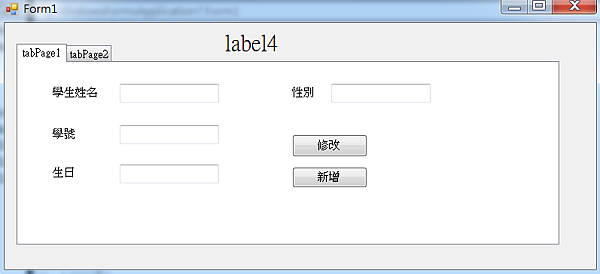
擷取
 
using System;
using System.Collections.Generic;
using System.ComponentModel;
using System.Data;
using System.Drawing;
using System.Linq;
using System.Text;
using System.Threading.Tasks;
using System.Windows.Forms;
using System.Data.OleDb;
using System.IO;
(繼續閱讀...)
文章標籤

chochenlu 發表在 痞客邦 留言(0) 人氣(1)

  • 個人分類:
▲top
  • 2月 19 週五 201615:33
  • 02/19

12980574_1773373076223804_154098705_n
 
 
package test;
 
(繼續閱讀...)
文章標籤

chochenlu 發表在 痞客邦 留言(0) 人氣(1)

  • 個人分類:
▲top
  • 12月 25 週五 201500:00
  • 期末考,匯入資料庫,新增修改刪除

66
using System.Data.OleDb;
using System.IO;

namespace WindowsFormsApplication7
{
    public partial class Form1 : Form
    {
        private OleDbConnection connection = new OleDbConnection();

        OleDbDataAdapter dAdapter;
        OleDbCommandBuilder cBuilder;
        DataTable dTable = new DataTable();
        BindingSource bSource;

        private string ID;

        public Form1()
        {
           
            InitializeComponent();
            connection = new OleDbConnection(@"Provider=Microsoft.ACE.OLEDB.12.0;Data Source=C:\Users\student\Desktop\WindowsFormsApplication7\WindowsFormsApplication7\bin\Debug\test1.mdb");


        }


        private void Form1_Load(object sender, EventArgs e)
        {
        

            dAdapter = new OleDbDataAdapter("select * from person where 識別碼  ", connection);

            cBuilder = new OleDbCommandBuilder(dAdapter);
            dAdapter.Fill(dTable);

            bSource = new BindingSource();
            bSource.DataSource = dTable;

            dataGridView1.DataSource = bSource;

        }

        private void button1_Click(object sender, EventArgs e)
        {
            connection.Open();

            OleDbCommand command2 = new OleDbCommand();
            command2.Connection = connection;

            command2.CommandText = "insert into person (name,stu_no,tel,sex) values('" + textBox1.Text + "','" + textBox2.Text + "','" + textBox3.Text + "','" + textBox4.Text + "')";

            command2.ExecuteNonQuery();

            dAdapter.Fill(dTable);

            connection.Close();
              
        }

        private void dataGridView1_CellContentClick(object sender, DataGridViewCellEventArgs e)
        {
            if (e.ColumnIndex == 0)
            {

                try
                {
                    var Value = dataGridView1.Rows[e.RowIndex].Cells[e.ColumnIndex].Value;
                    Value = dataGridView1.Rows[e.RowIndex].Cells["name"].Value;

                    connection.Open();
                    OleDbCommand command = new OleDbCommand();
                    command.Connection = connection;

                    string query = "select* from person where name='" + Value.ToString() + "'";
                    command.CommandText = query;


                    OleDbDataReader reader = command.ExecuteReader();
                    while (reader.Read())
                    {

                        ID = reader["識別碼"].ToString();
                        textBox1.Text = reader["name"].ToString();
                        textBox2.Text = reader["stu_no"].ToString();
                        textBox3.Text = reader["tel"].ToString();
                        textBox4.Text = reader["sex"].ToString();
                       

                    }
                    connection.Close();
                }

                catch (Exception ex)
                {
                    MessageBox.Show("ERROR" + ex);
                }
            }

            else if (e.ColumnIndex == 1)
            {
                if (MessageBox.Show("確定刪除此筆資料?", "刪除資料", MessageBoxButtons.YesNo) == DialogResult.Yes)
                {
                    try
                    {
                        var Value = dataGridView1.Rows[e.RowIndex].Cells[e.ColumnIndex].Value;
                        Value = dataGridView1.Rows[e.RowIndex].Cells["name"].Value;
                       
                        connection.Open();
                        OleDbCommand command = new OleDbCommand();
                        command.Connection = connection;


                        command.CommandText = "delete from person WHERE name = '" + Value.ToString() + "'";

                        command.ExecuteNonQuery();
                        dTable.Clear();
                        dAdapter.Fill(dTable);

                        connection.Close();
                        MessageBox.Show("刪除成功");
                    }
                    catch (Exception ex)
                    {
                        MessageBox.Show("ERROR" + ex);
                    }

                }
            }


        }

        private void button2_Click(object sender, EventArgs e)
        {
                         dTable.Clear();

                        connection.Open();
                        OleDbCommand command = new OleDbCommand();
                        command.Connection = connection;


                        command.CommandText = "UPDATE person SET name = '" + textBox1.Text + "'WHERE 識別碼 = " + ID ;

                      command.ExecuteNonQuery();

                      dAdapter.Fill(dTable);
        }
    }
}  
(繼續閱讀...)
文章標籤

chochenlu 發表在 痞客邦 留言(0) 人氣(0)

  • 個人分類:
▲top
  • 12月 11 週五 201500:00
  • 基本資料 成績 關聯 文字方塊

public partial class Form1 : Form
    {
        int[] array = new int[4];
        public Form1()
        {
           
            InitializeComponent();
            textBox1.DataBindings.Add("Text", bindingSource3, "name", true);
            textBox2.DataBindings.Add("Text", bindingSource3, "math", true);
           

            array[0] = 0;
            array[1] = 0;
            array[2] = 0;
            array[3] = 0;
        }

        private void Form1_Load(object sender, EventArgs e)
        {
            // TODO: 這行程式碼會將資料載入 'db1DataSet.DataTable1' 資料表。您可以視需要進行移動或移除。
            this.dataTable1TableAdapter.Fill(this.db1DataSet.DataTable1);
            // TODO: 這行程式碼會將資料載入 'db1DataSet.record' 資料表。您可以視需要進行移動或移除。
            this.recordTableAdapter.Fill(this.db1DataSet.record);
            // TODO: 這行程式碼會將資料載入 'db1DataSet.person' 資料表。您可以視需要進行移動或移除。
            this.personTableAdapter.Fill(this.db1DataSet.person);

        }

        private void button1_Click(object sender, EventArgs e)
        {
            bindingSource3.MovePrevious();
        }

        private void button2_Click(object sender, EventArgs e)
        {
            bindingSource3.MoveNext();
        }

        private void button3_Click(object sender, EventArgs e)
        {
            float sum1 = 0;
            float bn;
            float a;
            for (int i = 0; i < 3; i++)
            {
                array[i] = Int32.Parse(textBox2.Text);
                bindingSource3.MoveNext();
            }
            for (int i = 0; i < 3; i++)
            {
                sum1 = sum1+array[i];
            }
            bn = bindingSource3.Count;
            a = sum1 / bn;

            textBox3.Text = a.ToString();
        }
    }
}
(繼續閱讀...)
文章標籤

chochenlu 發表在 痞客邦 留言(0) 人氣(1)

  • 個人分類:
▲top
  • 11月 06 週五 201514:45
  • 11/6

未命名
using System;
using System.Collections.Generic;
using System.ComponentModel;
using System.Data;
using System.Drawing;
using System.Linq;
using System.Text;
using System.Threading.Tasks;
using System.Windows.Forms;
(繼續閱讀...)
文章標籤

chochenlu 發表在 痞客邦 留言(0) 人氣(3)

  • 個人分類:
▲top
  • 10月 30 週五 201515:35
  • 10/30

擷取
 
using System;
using System.Collections.Generic;
using System.ComponentModel;
using System.Data;
using System.Drawing;
using System.Linq;
using System.Text;
using System.Threading.Tasks;
using System.Windows.Forms;
(繼續閱讀...)
文章標籤

chochenlu 發表在 痞客邦 留言(0) 人氣(1)

  • 個人分類:
▲top
  • 10月 23 週五 201500:00
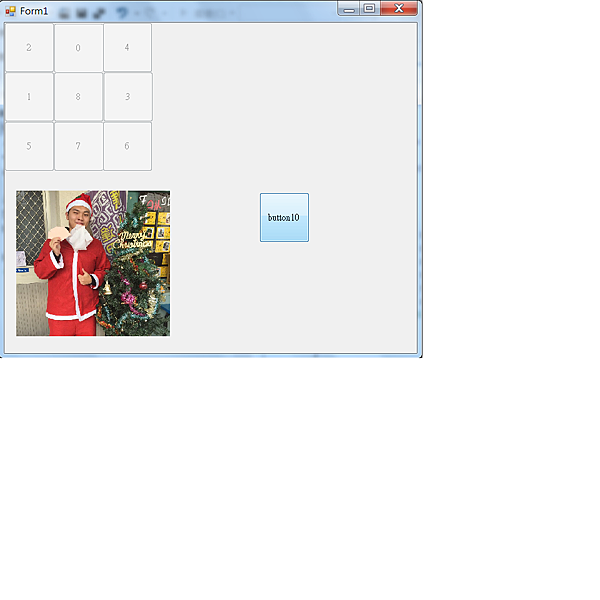
  • 推數字遊戲

12
public partial class Form1 : Form
    {
        int rndmoney1 = 100, rndmoney2 = 100, rndmoney3 = 100, rndmoney4 = 100, rndmoney5 = 100;
        int rndmoney6 = 100, rndmoney7 = 100, rndmoney8 = 100, rndmoney9 = 100;
        public Form1()
        {
            InitializeComponent();
            button1.Enabled = false;
            button2.Enabled = false;
            button3.Enabled = false;
            button4.Enabled = false;
            button5.Enabled = false;
            button6.Enabled = false;
            button7.Enabled = false;
            button8.Enabled = false;
            button9.Enabled = false;
        }

        private void button10_Click(object sender, EventArgs e)
        {
            Random rnd = new Random();
            rndmoney1 = rnd.Next(0, 9);
            rndmoney2 = rnd.Next(0, 9);
            rndmoney3 = rnd.Next(0, 9);
            rndmoney4 = rnd.Next(0, 9);
            rndmoney5 = rnd.Next(0, 9);
            rndmoney6 = rnd.Next(0, 9);
            rndmoney7 = rnd.Next(0, 9);
            rndmoney8 = rnd.Next(0, 9);
            rndmoney9 = rnd.Next(0, 9);

            button1.Text = rndmoney1.ToString();
            button2.Text = rndmoney2.ToString();
            button3.Text = rndmoney3.ToString();
            while(rndmoney1 == rndmoney2)
            {
              
                rndmoney2 = rnd.Next(0, 9);
              
                button2.Text = rndmoney2.ToString();
            }
            while (rndmoney3 == rndmoney2 || rndmoney3==rndmoney1)
            {

                rndmoney3 = rnd.Next(0, 9);

                button3.Text = rndmoney3.ToString();
            }
            while (rndmoney4 == rndmoney1 || rndmoney4==rndmoney2 || rndmoney4==rndmoney3)
            {

                rndmoney4 = rnd.Next(0, 9);

                button4.Text = rndmoney4.ToString();
            }
            while (rndmoney5 == rndmoney1 || rndmoney5 == rndmoney2 || rndmoney5 == rndmoney3 || rndmoney5==rndmoney4)
            {

                rndmoney5 = rnd.Next(0, 9);

                button5.Text = rndmoney5.ToString();
            }
            while (rndmoney6 == rndmoney1 || rndmoney6 == rndmoney2 || rndmoney6 == rndmoney3 || rndmoney6 == rndmoney4 || rndmoney6==rndmoney5)
            {

                rndmoney6 = rnd.Next(0, 9);

                button6.Text = rndmoney6.ToString();
            }
            while (rndmoney7 == rndmoney1 || rndmoney7 == rndmoney2 || rndmoney7 == rndmoney3 || rndmoney7 == rndmoney4 || rndmoney7 == rndmoney5 || rndmoney7==rndmoney6)
            {

                rndmoney7 = rnd.Next(0, 9);

                button7.Text = rndmoney7.ToString();
            }
            while (rndmoney8 == rndmoney1 || rndmoney8 == rndmoney2 || rndmoney8 == rndmoney3 || rndmoney8 == rndmoney4 || rndmoney8 == rndmoney5 || rndmoney8 == rndmoney6 || rndmoney8==rndmoney7)
            {

                rndmoney8 = rnd.Next(0, 9);

                button8.Text = rndmoney8.ToString();
            }
            while (rndmoney9 == rndmoney1 || rndmoney9 == rndmoney2 || rndmoney9 == rndmoney3 || rndmoney9 == rndmoney4 || rndmoney9 == rndmoney5 || rndmoney9 == rndmoney6 || rndmoney9 == rndmoney7 || rndmoney9==rndmoney8)
            {

                rndmoney9 = rnd.Next(0, 9);

                button9.Text = rndmoney9.ToString();
            }


            button4.Text = rndmoney4.ToString();
            button5.Text = rndmoney5.ToString();
            button6.Text = rndmoney6.ToString();
            button7.Text = rndmoney7.ToString();
            button8.Text = rndmoney8.ToString();
            button9.Text = rndmoney9.ToString();
            //button10.Enabled = false;


        }
    }
}  
(繼續閱讀...)
文章標籤

chochenlu 發表在 痞客邦 留言(0) 人氣(0)

  • 個人分類:
▲top
  • 10月 02 週五 201515:26
  • D0250578 卓承儒 紅綠燈

未命名
namespace WindowsFormsApplication1
{
public partial class Form1 : Form
{
int c = 0, d;
public Form1()
{
InitializeComponent();
}
(繼續閱讀...)
文章標籤

chochenlu 發表在 痞客邦 留言(0) 人氣(4)

  • 個人分類:
▲top
«12

個人資訊

chochenlu
暱稱:
chochenlu
分類:
不設分類
好友:
累積中
地區:

熱門文章

  • (4)D0250578 卓承儒 紅綠燈
  • (1)10/30
  • (3)11/6
  • (1)基本資料 成績 關聯 文字方塊
  • (0)期末考,匯入資料庫,新增修改刪除
  • (0)推數字遊戲
  • (2)4/15 期中考
  • (1)02/19
  • (1)3/11
  • (0)3/25

文章分類

  • 未分類文章 (1)

最新文章

  • 6/3 期末考
  • 5/20隨機亂數選題
  • 5/13出題目 文字方塊顯示
  • 5/6script
  • 4/29JavaScript
  • 4/21把亂碼改成繁體字
  • 4/21阿帕契架設與改字
  • 4/15 期中考
  • 3/25
  • 3/18

動態訂閱

文章精選

文章搜尋

誰來我家

參觀人氣

  • 本日人氣:
  • 累積人氣: